Profiles
General#
Skyblock offers players multiple profile slots for different islands. Profiles remain until the player decides to delete them. There are different types of profiles players can make, allowing for variation in gameplay.
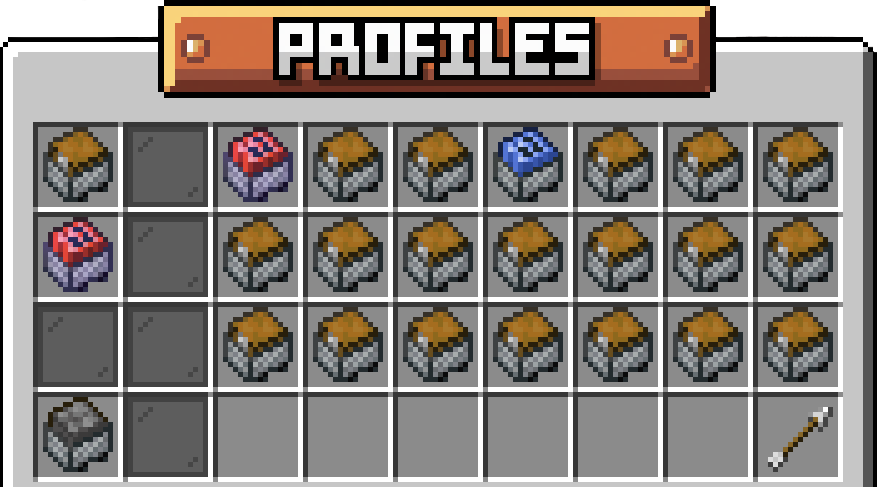
Change your profile by typing /profile and selecting the profile you wish to play. Click the Grass Block to create a new casual profile, or the TNT Minecart to create a competitive profile. Delete profile slots by right clicking the profile slot you wish to manage, then clicking the TNT. Note: This is irreversible!
Profile Types#
Competitive#
Competitive allows players to build their island and compete for the season's top leaderboard slots and prove themselves the Skyblock Champion! You can only have one active competitive profile slot, as it acts as your ticket entry into the season competition.
At the end of the season, your competitive island will turn into a casual island for you to continue playing. You will notice its item change from a red TNT minecart to a blue TNT minecart. This means it is a past competitive profile, and will function as a casual from now on.
A few rules apply only to competitive islands, to keep the race fair:
- Dying on your island costs 10% of the island balance. It is charged at most once every 5 minutes, and never if you were AFK when you died.
- Mining pauses when you go AFK. If you haven't moved your mouse for 20 seconds, block breaking stops until you look around again.
- No
/pay. You can't send money to anyone or receive it while on a competitive profile. - No unlimited spawners. The final Omnicoin tier of the Island Spawners upgrade can't be bought.
- Piston duping and wither block damage are blocked.
- Visitors can only be given a few permissions: Visit, Friends Visit, Doors and Fly.
Casual#
Casual allows players to play on an island indefinitely. You can have as many casual slots as your profile slot space allows! This makes casual great for secondary profiles with a less competitive-based approach as well as for testing out designs, playstyles, and playthroughs. You can purchase profiles slots in the Omnicoin shop /os
Coop#
Cooperative islands allow players to join up with friends on the same island. Invite players to become a part of your island by typing /is invite and having the other player click ACCEPT on the chat message. Joining someone's island will take up one of the players' active profile slots. Island members will be able to access the island even when the owner is offline.
Both casual and competitive islands can become Coop islands by inviting players. Instead of having the option to delete your island, players will have the option to leave the island they've been invited to. The owner of the island can also kick members by typing /is kick <player>.
Co-op does not have any restrictions or advantages in competitive seasons.
Paying Other Players#
On a casual profile, /pay <player> <amount> sends another player money. It arrives as a request with Accept and Deny buttons, and it expires if they don't answer in time. Check your island's money with /is balance. Competitive profiles can't send or receive payments.